AI superpowers, inside After Effects.
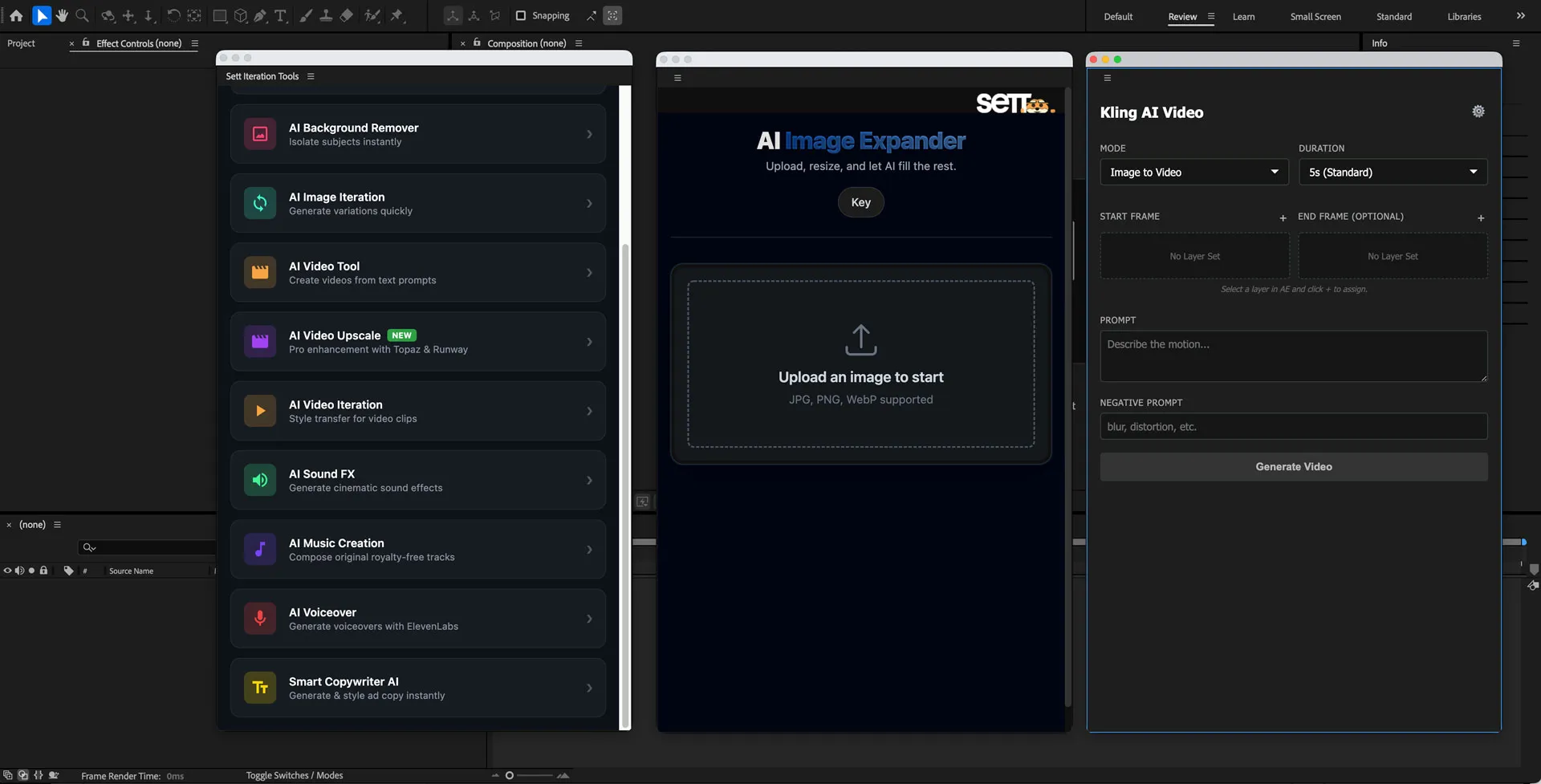
Motion designers were constantly switching between AE and a dozen external AI tools. After Effects Hub embeds 10 AI modules directly into the panel - image expansion, upscaling, background removal, video generation, audio, and copywriting - so artists never have to leave their native environment.
See it in action
Screenshots and a walkthrough of the panel in context - how it sits inside AE's interface, and how each AI module integrates with the timeline.
Design system
AE charcoal panel tokens, the purple/blue accent family, tight spacing, and the icon language that bridges the extension with AE's native chrome.
Under the hood
CEP Extension · After Effects · Kling · ElevenLabs. ExtendScript bridge, a local AI orchestration layer, results drop back onto the timeline.
AI tools existed. The workflow to use them was broken.
Motion designers working with AI in 2024 had no shortage of capable tools - Kling for video generation, ElevenLabs for audio, assorted web apps for upscaling and background removal. The problem was friction: every operation required exporting a frame, switching to a browser tab, waiting, downloading, re-importing, and realigning. A single AI touch-up could cost five minutes of context-switching and drag the creative flow to a halt. The motion team had the tools. What they lacked was integration.
Select, pick a module, get a result. Never leave AE.
The entire interaction model was designed to collapse to a single in-panel gesture - no app-switching, no file management, no re-import dance.
or comp in AE's
timeline
in a single
docked panel
remove bg,
generate…
upscaler - your
choice of model
to timeline
auto-placed,
ready to edit
The decisions that shaped the whole thing.
"Reduce round-trips" is easy to say. Three early bets turned it from a goal into a system - where the panel lives, how modules are surfaced, and what "done" means for a result.
Live inside AE, not next to it.
The extension is a proper CEP panel, docked exactly like Lumetri Color or Essential Graphics. It inherits AE's dark chrome, responds to the active comp and selected layer, and writes results back as new layers - not as files the designer has to manually import. The host app is the UI.
10 modules, one surface.
Image expansion, upscaling, background removal, video generation, audio synthesis, copywriting, and more - all in a single panel, organised by category. No hunting across tabs or windows. Context is preserved because the panel sees what AE sees: active comp, selected layer, current time.
Results land on the timeline.
When an AI module finishes, the result isn't a download - it's a new layer, already at the correct in/out point, sitting above the source in the comp. The designer picks it up from exactly where they were. No re-import, no timeline shuffle, no alignment work.
Small calls that change how the whole thing feels.
A panel that works and a panel that feels native are different things. Here are the micro-decisions that closed the gap.
The panel inherits AE's dark theme.
CEP extensions can render anything in a web view, but most feel foreign because they bring in their own light or colourful UI. The Hub is built in charcoal and near-black - the same surface tones as the AE panels next to it. An artist opening it for the first time shouldn't notice a visual seam.
Module selection reads the active layer.
Opening the panel when a footage layer is selected pre-scopes the available modules: video generation and background removal are foregrounded; audio modules are muted. The panel's state is driven by AE's state - the designer never has to tell it what they're working on.
Progress lives in the panel, not a modal.
AI generation can take 10–60 seconds. Rather than blocking AE with a spinner dialog, the panel shows a progress bar and status label inline - the designer can keep working on other layers while the module runs in the background. The result quietly appears when it's ready.
One-click rollback to the original.
Every AI operation keeps the source layer in the comp - it's just moved below the result and set to solo-off. If the result isn't right, the designer collapses the generated layer and they're back to the original in one click. No destructive edits, no undo chain required.
Model selection is optional, not mandatory.
Each module has a sensible default model - Kling for video, ElevenLabs for audio - that a designer can use without thinking. The model picker is a secondary control, visible but not loud, for the times when they specifically want to swap out the engine.
Developed with the motion team, not for them.
The module set, default prompts, and output naming conventions all emerged from sessions with the motion team. Engineers and designers prioritised which AI tasks were most repetitive and built those first. The panel reflects real bottlenecks, not a spec of theoretical features.
One dark system, built to disappear into AE.
The panel is designed to feel native, not just functional. A charcoal surface family, a single purple/blue accent that echoes AE's own brand, and a tight monospace label language pulled from the host app's conventions. The full token system lives on the Design page.
A palette that reads natively inside AE's interface.
No light surfaces, no colour-wash backgrounds. The panel is built on the same charcoal-to-dark-grey spectrum as AE's own chrome. The accent - electric purple shifting to AE blue - is the only saturated hue in the system, so it always reads as "actionable" against the dark ground.
Inter body, JetBrains Mono for system labels.
Inter 700 is crisp and technical at every size - it matches the engineering-tool aesthetic of AE's own panel headers without looking designed-in from outside.
Regular Inter at 400–500 stays readable on dark surfaces without needing any anti-aliasing tricks. Scales comfortably from 13px helper text to 17px panel body.
Used only where a label needs to read as "system output" - section eyebrows, status strings, and the spec labels throughout this doc.
Tighter radii than a consumer app - this is a tool.
AE's own UI uses minimal border-radius. The Hub matches that with a tight scale: 6px chips, 10px buttons, 14px cards - rounded enough to avoid harshness, sharp enough to read as professional tooling.
The icon reads as AI-inside-AE at icon size.
The icon marks an extension that lives at the intersection of Adobe's toolchain and a new generation of AI infrastructure. The mark uses the same purple/blue accent family as the panel's interactive chrome - so it's identifiable in AE's dock before the designer even reads the label. In-panel glyphs are 1.5px stroke line icons, slightly lighter than the body weight, so they feel cut from the same material as AE's own iconography.
Purposeful feedback, not decoration.
The cuts I'd defend.
Building inside a professional creative tool means being ruthless about what belongs in the panel and what doesn't. Here's what was deliberately left out - each cut keeps the extension tight, focused, and trustworthy.
All processing happens via direct API calls - no intermediate cloud storage of the designer's footage. Sending client footage through a middleman storage layer would be a hard no for professional studios. Each module calls its AI provider directly and writes results back to the local AE project.
Most modules don't expose a freeform prompt field - they expose parameters. For background removal or upscaling, there's nothing to prompt. For video generation, the prompt defaults to the layer name or comp notes. Freeform text boxes were reserved only for modules that genuinely need them, like copywriting.
AE's own undo stack is the history. Every AI result lands as a named layer in the comp - the comp's layer panel is the history. A separate "AI history" panel would duplicate information and fragment the designer's mental model of their project.
10 modules covering the most repetitive tasks - not every AI capability available. Modules like style transfer, AI colour grading, and motion tracking were considered and deferred. The constraint was: if the motion team doesn't hit this bottleneck at least twice a week, it waits for a later version.
CEP, AE scripting, and a modern AI stack.
The extension runs inside AE's Common Extensibility Platform, bridges to the host app via ExtendScript, and routes AI calls to Kling, ElevenLabs, and purpose-built upscaler APIs - all without the designer touching a file.